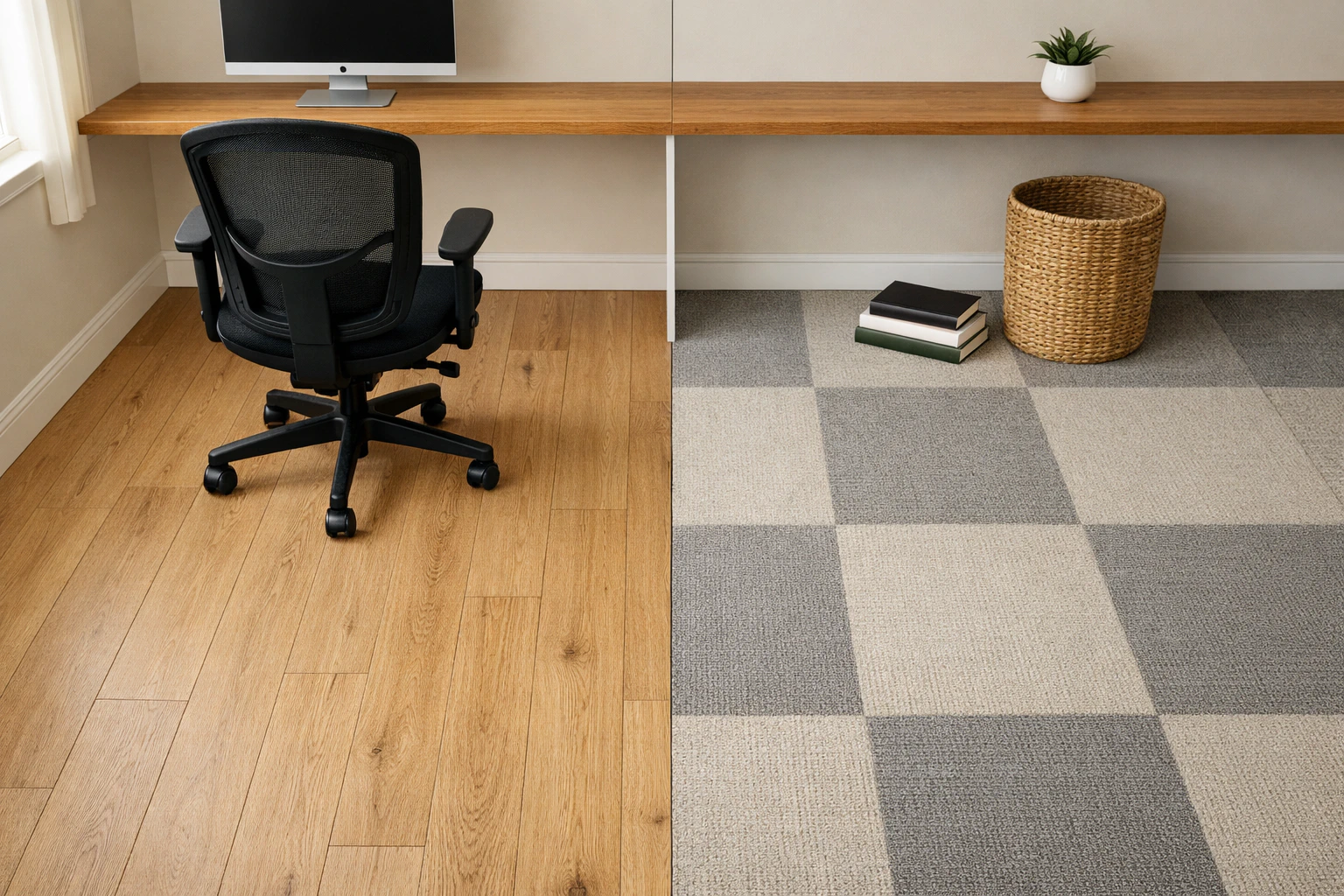
Updated July 2026. Prices reflect US market costs from Amazon, FLOR direct, Home Depot and Lowe's. All comparisons based on a typical 10×12 ft home office (120 sq ft) with a single desk-and-chair workstation.
The WFH floor decision the office furniture industry doesn't help you with
Standing desks, ergonomic chairs, monitor arms, mic booms — the home office furniture industry has produced near-perfect guidance on every desktop component. The floor under all of it gets one paragraph in a corporate-feeling buyer's guide and zero useful comparison. But the floor is where the WFH workday actually lives: chair wheels rolling 30-50 times a day, coffee spills, dropped pens, typing-impact reverb the mic picks up, and 8+ hours a day of bare feet or sock feet underneath you.
The short version: LVP at $336 rolls a chair freely without a mat, holds up to 5 years of WFH chair-wheel abrasion when you pick the right wear layer, and supports clean cable management. FLOR carpet tiles at $240-360 (plus $80-150 chair mat = $320-510 total) absorb the typing-and-keyboard impact the mic amplifies on every video call, let you swap one stained tile instead of replacing the whole floor, and stay warmer underfoot. The decision comes down to whether you do more video calls or more deep-work rolling around your desk.
Below: side-by-side table, when each one wins, the 60,000-wheel-pass chair-wear math nobody talks about, the video-call mic-pickup advantage carpet tiles deliver, the hybrid LVP+tile-patch layout professional home-office designers actually use, and FAQs specific to WFH use.
Side-by-side comparison
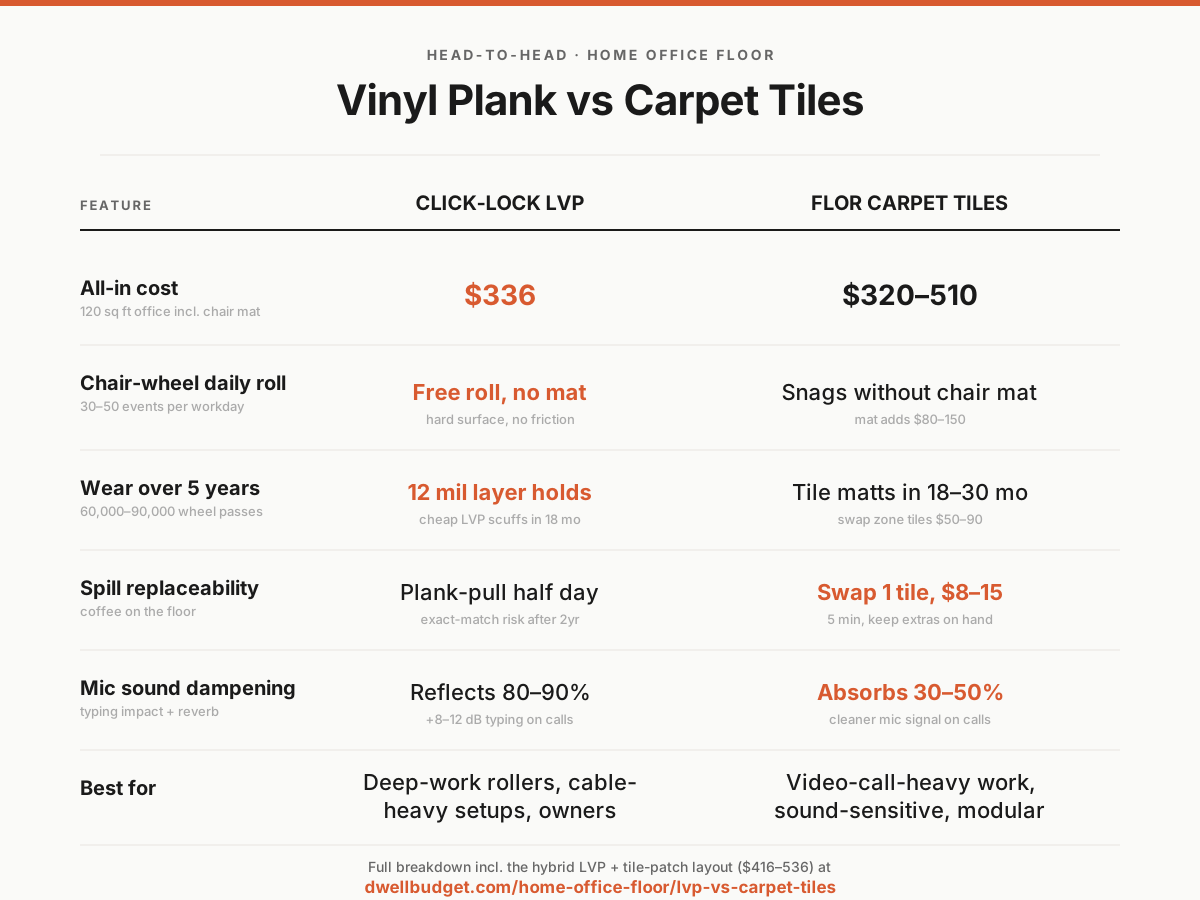
| Click-lock LVP | FLOR carpet tiles | |
|---|---|---|
| Material cost (120 sq ft) | $336 | $240–360 |
| Chair mat needed? | No — rolls freely | Yes — $80–150 extra |
| All-in cost | $336 | $320–510 (incl. chair mat) |
| Chair-wheel daily roll | Free roll on hard surface | Snags without chair mat |
| Chair-wheel wear (5 yrs) | 12 mil wear layer holds; cheaper LVP scuffs | Tile in chair zone matts in 18–30 mo |
| Spill / stain repair | Plank swap — half-day, exact-match risk | Tile swap — 5 min, $8–15 per tile |
| Sound dampening (mic) | Reflects typing impact — 8–12 dB louder | Absorbs 30–50% high-freq reflection |
| Cable management | J-channel raceway adheres cleanly | Cables ridge under tiles, snag chair |
| Bare-feet warmth | Cold underfoot — slab temp | Warmer — closed-cell foam pad |
| Resale signal | "Hardwood throughout" — modest premium | None — buyers see as office add-on |
| Best for | Deep-work rollers, cable-heavy setups, owners | Video-call-heavy work, sound-sensitive, modular |
When to pick vinyl plank
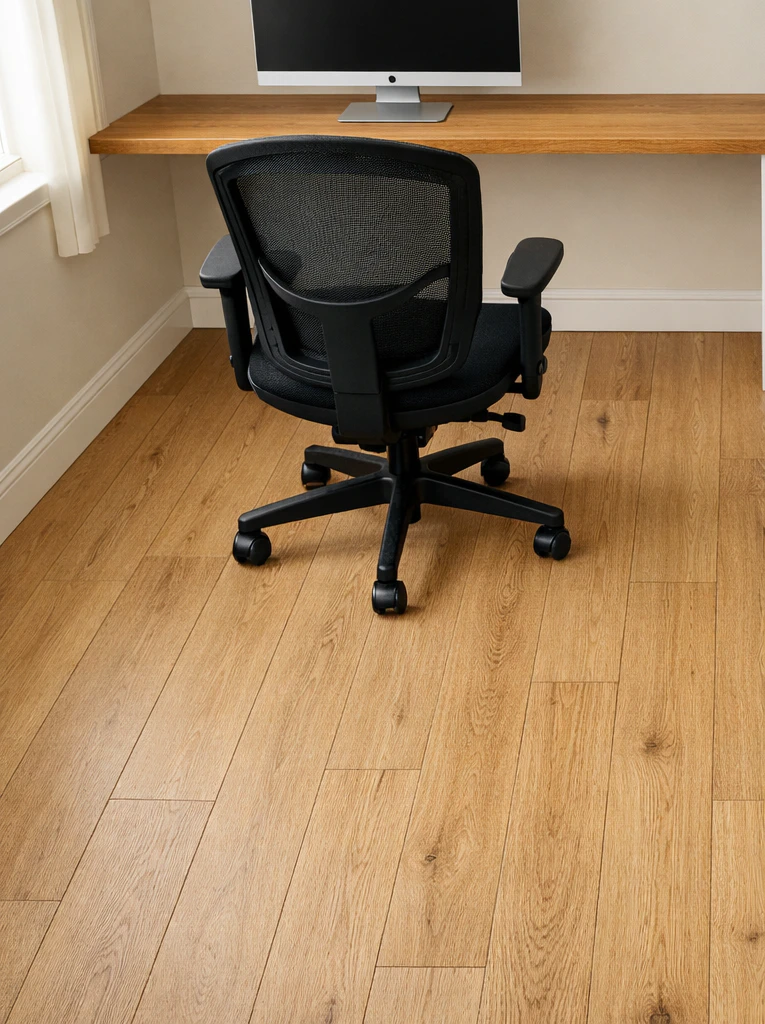
Pick click-lock LVP if at least three of these are true:
- You do mostly deep-work / async-typing days — video calls are a minor part of the week
- You roll around between desk + secondary workspace (printer, side table, whiteboard) frequently
- Your setup has 10+ cables (monitors, lights, mic, webcam, hub, charger) — cable management matters
- You own the home and want the "hardwood throughout" resale signal
- You're OK with cold bare feet in exchange for clean wood-look aesthetic
Click-lock LVP from LifeProof or Smartcore at $2.80/sq ft hits $336 for a 120 sq ft office plus a Saturday of install. The all-in cost advantage is real: no chair mat needed (the $80-150 you'd spend on carpet tiles + mat goes back in your pocket), no chair-mat-slides-around frustration, no carpet-snag chair-roll resistance.
The under-discussed advantage for WFH specifically is cable management. Modern desk setups average 10-15 cables (monitor power + monitor signal, laptop charger, hub, webcam, microphone, ring light, phone charger, monitor light, keyboard cable, mouse cable, sometimes ethernet, sometimes a foot-rest USB charger). LVP's flat hard surface holds adhesive cable raceways cleanly along baseboards and lets low-profile floor covers transit cables across open floor without ridges. Carpet tiles fight all of this.
What you give up: typing-impact mic pickup (8-12 dB louder on every video call vs carpet — meaningful for client-facing video), cold bare feet in winter (slab temperature year-round in basement offices), per-tile spill recovery (LVP spill = plank-pull half-day; carpet tile spill = 5-minute swap), and fewer chair-wheel-wear forgiveness if you spec a cheap 6-8 mil wear layer instead of a 12 mil+ "heavy residential" rated plank.
When to pick carpet tiles
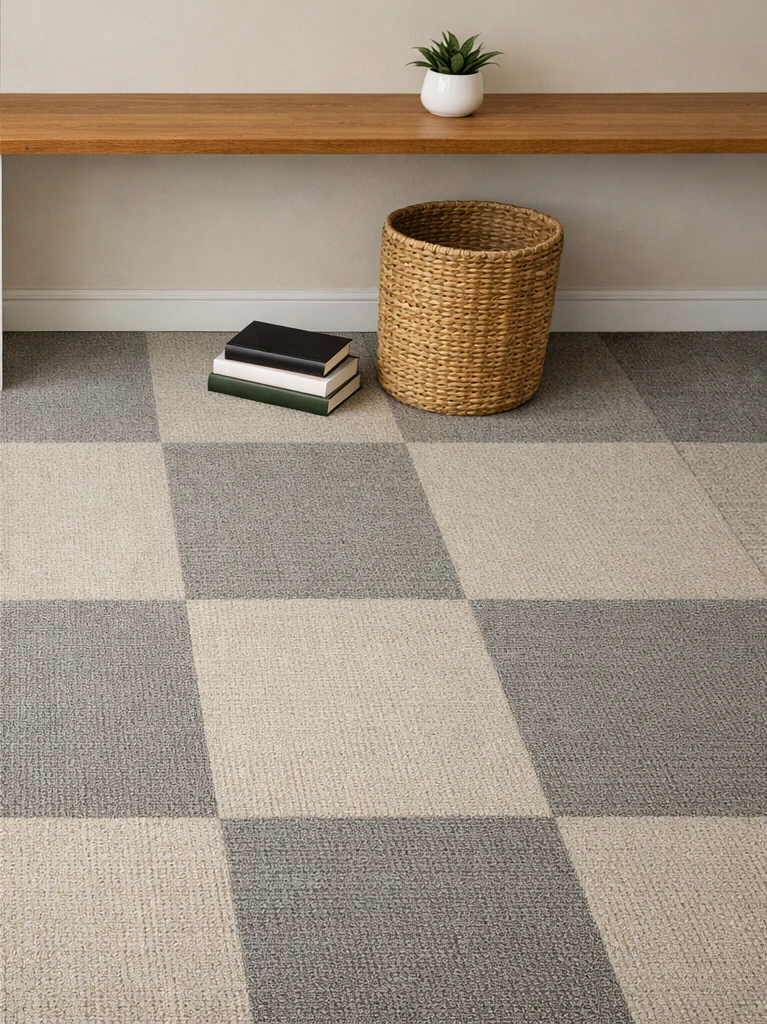
Pick FLOR carpet tiles if at least three of these are true:
- You do 4+ hours of video calls a day (sales, client meetings, content creation, recorded video)
- You type on a loud mechanical keyboard and your mic picks up every clack
- You spill often enough that "swap one tile" beats "pull a plank"
- Your home office is in a basement or over an unheated space — cold bare feet are a daily issue
- You move/redecorate frequently and want to redo the floor without a full remodel
FLOR modular tiles direct from flor.com at $2-3/sq ft hit $240-360 for a 120 sq ft office (24×24 inch tiles, so 30 tiles total). Add a clear polycarbonate chair mat for the chair zone at $80-150 = $320-510 all-in.
The biggest WFH-specific argument for carpet tiles is video-call audio. Carpet absorbs roughly 30-50% of the high-frequency reflection that microphones (laptop, USB, headset boom) pick up from typing impact, keyboard clacks, chair wheel rolls, and the small foot-shuffle sounds 8 hours of WFH produce. The audio improvement is the kind of "I sound more professional" upgrade that compounds over hundreds of calls per year without any single-call moment where you notice it explicitly.
The second WFH-specific argument is per-tile spill recovery. A coffee-on-LVP spill is a wipe-up moment; a coffee-on-LVP-that-soaked-into-the-subfloor (the slow-discovery scenario) is a half-day plank-pull-and-replace project. A coffee-on-carpet-tile spill is a 5-minute tile swap with a pre-bought exact-match spare. Over a 10-year office lifespan, the spill-recovery math compounds.
What you give up: chair-wheel resistance (free-rolling needs a chair mat, which adds $80-150 to all-in cost), tile-matting in the chair zone after 18-30 months under daily wheel use (cheap fix is replacing the 4-6 zone tiles), cable management complications (cables ridge under tiles, raceway adhesive fails on carpet fiber), and zero resale signal (buyers see carpet tile as "office add-on" rather than premium floor).
The 60,000-wheel-pass chair-wear problem
This is the WFH-specific factor that decides chair-wheel material selection but almost no flooring marketing addresses in measurable terms.
The math: a typical WFH workday includes 30-50 chair-roll events (away from desk to grab water, back to desk; turn to side table; roll to printer; reset chair position). Each roll involves all 5 chair casters rolling over the same 4-6 sq ft zone in front of the desk. Over 5 years of WFH use, that's 60,000-90,000 wheel-pass events on the same wear zone.
LVP wear behavior: Quality LVP with a 12 mil or thicker wear layer (LifeProof, Smartcore, Shaw Floorte) is rated for "heavy residential to light commercial" — which is exactly the chair-wheel scenario, formally tested. Visible scuff appears around year 5-7 in the wheel zone, but the wear layer is thick enough that the printed wood pattern beneath stays intact for the full 12-15 year lifespan. Cheap LVP with 6-8 mil wear layers shows scuff marks within 18-24 months and the printed pattern wears through by year 4-5. Wear layer thickness is the spec that matters; ignore everything else on the marketing card.
Carpet tile wear behavior: Loop-pile carpet tiles in the chair-wheel zone compress and matt visibly within 18-30 months of daily WFH use. The good news: this is a 5-minute fix. Swap the 4-6 worn tiles for fresh ones at $8-15 each (buy 4 extra of your selected pattern on day one as exact-match replacements). The bad news: it's a maintenance schedule rather than a passive surface. Over 10 years, expect 4-5 chair-zone-tile-swap cycles at $50-90 each = $200-450 in maintenance.
The 10-year amortization: LVP at $336 + zero maintenance = $336 over 10 years = $34/year. Carpet tiles at $320-510 all-in + $200-450 in chair-zone swaps over 10 years = $520-960 = $52-96/year. LVP is meaningfully cheaper per year over a 10-year horizon — that's the cost-per-year math the parent article references in the "smart money" framing.
Sound dampening for video-call mic pickup
The second WFH-specific factor: how each floor handles the typing-and-impact sounds your mic picks up on every video call.
The physics: typing impact transmits through the desk legs into the room as low-frequency thud (40-200 Hz range), reflects off hard surfaces (floor, walls, ceiling), and lands back at the mic at 8-12 dB above the original impact. Mechanical keyboards with hard Cherry MX clacks are worst (the upper-end frequency from each keystroke is exactly in the 2-4 kHz "annoying" range that calls perceive as "they're typing loud").
LVP behavior: hard floor reflects roughly 80-90% of high-frequency reflection back into the room. Typing sounds compound across the call. The fix is a thick area rug under the desk (5×7 ft minimum, with a felt-and-rubber pad to add absorption), which recovers most of the carpet-tile audio advantage at the cost of constraining where the chair can roll.
Carpet tile behavior: closed-cell foam padding + loop-pile surface absorb roughly 30-50% of high-frequency reflection. The mic-pickup improvement is real and noticeable in side-by-side test recordings (you can hear the typing-clack reduction the first time you A/B them). For sales calls, client video, content recording, or podcast episodes from your home office, this is the meaningful WFH audio upgrade.
The bottom line: if video-call audio quality matters to your work, carpet tiles deliver the upgrade without an additional mic, audio interface, or acoustic panel investment. If you mostly type async with occasional camera-off meetings, the audio difference doesn't compound enough to override LVP's chair-wheel and cable-management advantages.
The hybrid layout designers actually use
For dedicated home offices where chair-wheel rolling AND video-call audio AND cable management all matter, the combined approach gets you most of the benefits without forcing one to compromise the others.
The recipe:
- LVP across the full office — Saturday install, $336, handles cable raceways cleanly, rolls a chair anywhere outside the desk zone
- 6×6 ft or 8×8 ft "carpet tile patch" under the desk-and-chair zone — 9-16 FLOR tiles placed directly on top of the LVP, $80-120 in tiles. The patch defines the workspace visually (gives the office a "designed zone" feel), adds audio absorption exactly where the mic picks it up, and warms the under-desk floor where your feet actually sit
- Anti-fatigue mat on top of the carpet patch if you have a standing desk — at the standing position only, $50-80. Carpet alone isn't a substitute for proper anti-fatigue foam, even though it feels softer
The math: $336 LVP + $80-120 carpet tile patch + optional $50-80 anti-fatigue mat = $416-536 total for the complete WFH-optimized floor. That's actually less than full-room carpet tiles + chair mat ($320-510) once you factor in the chair-mat cost, and it delivers better cable management and easier chair rolling outside the desk zone.
The aesthetic logic: the carpet tile patch reads as "this is my work zone" the way an area rug defines a living-room conversation pit. It pulls the office together visually and gives the room intentional design even if the rest of the floor is plain LVP throughout. This is what California Closets and Container Store home-office consultants quietly recommend when budget allows.
The short verdict
Pick click-lock LVP if your work is mostly deep-typing/async, you roll between multiple desk zones, your cable-heavy setup needs clean raceway management, or you want the "hardwood throughout" resale signal. The all-in cost edge ($336 vs $320-510 with chair mat) and per-year amortization ($34/yr vs $52-96/yr) favor LVP on the 10-year math. Pick FLOR carpet tiles if you do 4+ hours of video calls a day, you type on a loud mechanical keyboard the mic amplifies, spills happen often enough that per-tile swap math beats plank-pulls, or your office is in a cold basement. For dedicated home offices with budget, do the hybrid — LVP across the full room + carpet tile patch under the desk zone, $416-536 total for the chair-rolling + audio-dampening + cable-managed combination.
Comparing more home office floor options? The full home office floor guide also covers Imprint CumulusPro anti-fatigue mats for standing desks (the non-negotiable WFH ergonomic add-on) and Ruggable washable area rugs for renters (the floor refresh that survives coffee disasters).
 11 Best LVP Brands 2026
 Full home office floor guide
 Home Office Walls: Wallpaper vs Paint
 Bedroom Floor: Area Rug vs Vinyl Plank
 Kitchen Floor: LVP vs Tile